Archive for the ‘Usability’ Category
Thursday, September 29th, 2011 by Jesper Rønn-Jensen
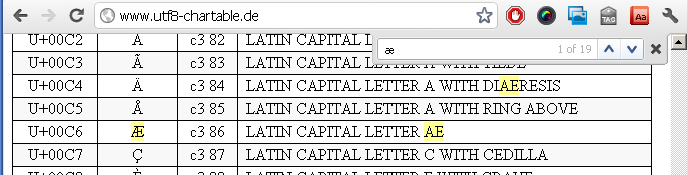
Look at this chrome search for the Danish letter “æ” in a page.
 .
.
Notice how Chrome actually also shows occurrences of “ae” when searching for “æ”.
I am suggesting a subtle change to better support a common usecase…
Tags: Browser, chrome, find, google, search, Usability, webkit
Posted in Browser, Usability | 1 Comment »
Sunday, April 10th, 2011 by Jesper Rønn-Jensen
[English: From time to time, I will post stories in Danish, when I consider it to be specifically relevent to Danish usage, (or simply easier for me). Therefore, find the below story in Danish (and here is a translate article link, in case you want to read it in Englsh)] Da Danske netbank for et […]
Posted in In Danish, Usability | 18 Comments »
Friday, March 26th, 2010 by Jesper Rønn-Jensen
I just saw this feature today: Google added direct links into the list of autocompleting search results: In this case, I searched for “earth h….” and it suggests “earth hour 2010” But on top of that, it inserts a link to the most relevant website directly. Smart and time-saving, i suppose. Also, it does not […]
Posted in Usability, Web Development | 9 Comments »
Thursday, February 4th, 2010 by Jesper Rønn-Jensen
Blogging for the first time in a long time from my wife’s computer, because I’m installing my brand new Intel SSD hard drive in my macbook. Oddly enough I ran into a few things during the install process that I think Apple could improve in their interface. (using Snow Leopard) Apple should recognize a new […]
Tags: mac, restore, system, usablitiy
Posted in OS X, Usability, User experience | 1 Comment »
Friday, October 2nd, 2009 by Jesper Rønn-Jensen
Smashing Magazine recently published “10 Useful Usability Findings and Guidelines“. Actually great work by Dmitry Fadeyev. I find the list well-written, well documented and the principles are easy to apply (or advocate in your team). The main points are: 1. Form Labels Work Best Above The Field 2. Users Focus On Faces 3. Quality Of […]
Tags: Usability
Posted in Usability | 7 Comments »
Monday, September 21st, 2009 by Jesper Rønn-Jensen
Sometimes, when doing web development, we forget that not everybody are as familiar with the web jargon as ourselves. This example from Pixum (internet photo developer) shows a good detail: The status message from Pixum gives immediate feedback that makes it easy to go to next step Note that the status message contains a link […]
Tags: e-commerce, Usability, User experience
Posted in Usability, User experience, Web Development | 7 Comments »
Thursday, August 13th, 2009 by Jesper Rønn-Jensen
It has long annoyed me that there is no intuitive, straightforward way to disable smileys in chat programs. Today I found that these two commands can do it for iChat for mac: $ cd /Applications/iChat.app/Contents/Resources/English.lproj/ $ mv SmileyTable.plist SmileyTable.plist.bak Restart iChat. (tip from MacOSXhints.com: Disable graphical smileys in iChat 3.0 but it works for me […]
Posted in OS X, Software, Usability | 6 Comments »
Saturday, May 16th, 2009 by Thomas Watson Steen
This is one of the most dissatisfying customer experiences I’ve had in a long, long time. I’m managing a website for a customer and they want to have the AdSense program running on their site. Piece of cake I thought… First off I created a new AdSense account for the domain with my customers contact […]
Posted in Rant, Review, Search Engines, Usability, User experience | 13 Comments »
Monday, May 11th, 2009 by Jesper Rønn-Jensen
Frustrated by internal systems! I just finished writing a page for our intranet. But now I ended up frustrated with no article published: First attempt: After spending 10 minutes writing I pressed “save and exit”. but the article never changed. Second attempt: Spent another 10 minutes writing. In the review I pressed Command+backspace to delete […]
Tags: frustration, internal, Usability
Posted in Usability | 8 Comments »
Sunday, February 1st, 2009 by Jesper Rønn-Jensen
It took me a little while to use the new file deletion principle from Google Groups administrator. You see the list of files, then click delete on the row you want to delete.The row then appears “selected” (the darker colored rows at the bottom). What confused me was that it still says “delete” followed by […]
Tags: google, Usability
Posted in Usability, User Interface | 6 Comments »
Wednesday, January 28th, 2009 by Jesper Rønn-Jensen
In general it’s good to use the human time formats (1 hour ago, 2 months ago, etc.) that you see in many of the new web applications. In general, the detail level is up the shorter the time span.
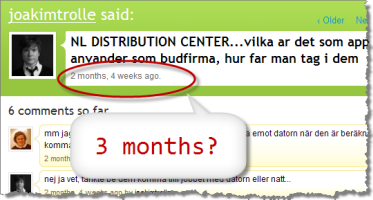
Tags: format, human, jaiku, time, Usability
Posted in Usability, User Interface | 9 Comments »
Wednesday, January 14th, 2009 by Jesper Rønn-Jensen
Just purchased Jakob Nielsen’s new screenshot-packed “10 Best Intranets of 2009” report, which I plan to use as inspiration in my company. It might be of value to other Capgemini employees so I purchased the “site license to make copies within your organization and place on your own intranet”. Capgemini colleagues are free to contact […]
Tags: capgemini, intranet, Usability
Posted in Usability | 1 Comment »
Thursday, August 28th, 2008 by Jesper Rønn-Jensen
Here are two different download paradigms presented by Firefox download page and Microsoft Internet Explorer 8 download page (full size) (full size) It is interesting to see the difference in prioritation of the actions. Microsoft makes all download actions equally important. Which results in 20 download icons that all fight to drag attention. Firefox, on […]
Tags: screenshot, Usability
Posted in Usability | 22 Comments »
Thursday, June 26th, 2008 by Jesper Rønn-Jensen
Jungle drums pointed me to the brilliant usability principles posted by Google. I decided to quote them below here, because it would be interesting to see what changes will be applied over time. Furthermore, the principles are really, really good and deserve attention. I like that there is room for performance specific measurements (“every millisecond […]
Posted in Usability, User experience | 7 Comments »
Monday, February 11th, 2008 by Jesper Rønn-Jensen
It takes a lifetime to become an expert on the usability field. Many developers may be interested in creating usable, successful applications. But the entry barrier is sometimes too high — it’s easier to rely on the usability experts than to know about usable applications themselves. Although I’m really passionate about usability, I really understand […]
Posted in Usability | 10 Comments »
Thursday, January 17th, 2008 by Jesper Rønn-Jensen
My Norwegian friend Eidar just wrote to inform me that their company (Netlife Research) has finally released Bad Usability Calendar 2008. Last year, the calendar got quite popular and even Jakob Nielsen mentioned it in one of his newsletters. This year, I’m more than ever looking forward to use it. The calendar has — as […]
Tags: Accessibility, calendar, Humor, Usability, User experience
Posted in Humor, Usability | 3 Comments »
Friday, January 11th, 2008 by Jesper Rønn-Jensen
Paypal showed me this splash screen when logging in: I think this is a useful design pattern that can be valuable to most of our clients dealing with time-sensitive data. It is time-consuming for an application to check if there are new payments on every request. This check is better off being uncoupled from the […]
Posted in Performance, Usability, User experience | 2 Comments »
Sunday, January 6th, 2008 by Thomas Watson Steen
This Friday, Jesper and I had a chat about things we don’t like about the current WordPress WYSIWYG editor. In particular when trying to write code examples in our posts: Jesper: One change I really would appreciate in the next WordPress would be the ability to shift wysiwyg/code editor directly on the edit page (Now […]
Posted in Usability, WordPress | 70 Comments »
Thursday, January 3rd, 2008 by Jesper Rønn-Jensen
In case you missed the thorough pagination gallery that was published in November: Pagination Gallery: Examples And Good Practices There are really some good (and bad) examples collected at the page, including these written “best practices”: Provide large clickable areas Don’t use underlines Identify the current page Space out page links Provide Previous and Next […]
Posted in Usability | 29 Comments »
Friday, December 21st, 2007 by Jesper Rønn-Jensen
These days I’m working on the HTML and CSS for this map, but I want to hear your opinions as what to recommend from a usability point of view: The top map where the cities are placed on the map directly (it’s a HTML list) The bottom map where the list is to the right […]
Posted in Usability, Web Standards | 7 Comments »
Wednesday, November 28th, 2007 by Jesper Rønn-Jensen
Just a quick note to mention that my friend Eidar and his colleagues at Netlife Research in Norway are now preparing the 2008 version of the Bad Usability Calendar. Please do post your proposals as a bad usability calendar is a perfect wallpaper and I have used it on several occasions for raising awareness about […]
Tags: Accessibility, calendar, Humor, Usability, User experience
Posted in Usability | 1 Comment »
Tuesday, November 27th, 2007 by Jesper Rønn-Jensen
Get ready for a suicide mission: On this blog, we will remove our spam filter completely for one day, December 15th. Today we got our spam comment number 500,000. Pretty scary to think how much energy, computer power, network traffic is wasted on a completely useless activity: To spoil the content with irrelevant comments. Currently […]
Posted in Best of Justaddwater, Blogging, justaddwater.dk, spam, Usability, WordPress | 73 Comments »
Tuesday, November 13th, 2007 by Jesper Rønn-Jensen
I have recently been working with usability an internal timereporting system in Capgemini. Due to time and scope limitations, there has been focus on the “low hanging fruit”.
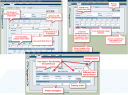
Here are some of the lessons learned.
Tags: capgemini, improvements, qlockwise, timereporting, Usability
Posted in justaddwater.dk, Review, Usability | 8 Comments »
Friday, November 2nd, 2007 by Jesper Rønn-Jensen
Take a look at Khoi Vinhs brilliant article If It Looks Like a Cow, Swims Like a Dolphin and Quacks Like a Duck, It Must Be Enterprise Software: Enterprise software, it can hardly be debated, is pretty bad stuff. The high-dollar applications that businesses use to run their internal operations. […] If you work at […]
Posted in Ruby on Rails, Usability | 1 Comment »
Friday, October 5th, 2007 by Jesper Rønn-Jensen
The blog software WordPress is just released in version 2.3. One of the new additions are a feature that can rescue and correct links when users accidentally follow a link in an email broken over 2 lines. Or following an old link that the blog author has renamed. We’ve cleaned up URLs a bunch in […]
Posted in Usability | 1 Comment »
Thursday, September 27th, 2007 by Jesper Rønn-Jensen
Asa Raskin has made a really useful example of how to implement undo easily in user interfaces. Here’s the example file (linked directly to a page at his company Humanized). Try deleting some items and then press undo. Note how there is no confirmation when you delete and the items can come back pressing undo. […]
Posted in Usability, User experience | 5 Comments »
Friday, September 14th, 2007 by Thomas Watson Steen
When asking a user about personal details you should also tell what you are going to use it for. Basically it’s always good practice to have a privacy policy available on your website so users can see what data is being collected about them, how it is uses etc. Many cooperate websites have privacy policies. […]
Posted in Blogging, justaddwater.dk, Usability | 1 Comment »
Tuesday, September 11th, 2007 by Jesper Rønn-Jensen
You might know this example. It works this way in Adobe Photoshop. Drag to adjust numberic value Mouseover the input box, hold down Cmd + drag left or right to increase / decrease. Hold down Cmd + Opt or Shift key and drag can change the value in decimal or 10 interval. This shortcut works […]
Posted in Productivity, Usability, User Interface | 2 Comments »
Saturday, August 11th, 2007 by Jesper Rønn-Jensen
Two very interesting videos about Google The new innovative improvements to Google Maps… View the demo video (it’s just a few minutes):Via Jacob Hage’s blog. My favorite is the drag-and-drop replanning of routes. Danish competitors are lightyears behind here… If you have not seen it: Check out Douglas Merril (CIO at Google) talk about innovation […]
Posted in Links, Security, Speaking, Usability | 3 Comments »
Thursday, July 26th, 2007 by Jesper Rønn-Jensen
A colleague of mine — and I don’t consider him lazy — told me today, that he would refrain from participating in a product forum because he had to register as a user. In his opinion, it was an interesting debate of a product missing an essential feature. An employee from the company had already […]
Posted in Usability, User experience | 11 Comments »
Thursday, June 28th, 2007 by Jesper Rønn-Jensen
While being on vacation in beautiful Toscana, Italy, i’m trying out the Opera Mini browser on my Nokia 6233 cell phone. It is actually possible to use the blog administration software on the browser (log in, navigate, write posts, etc.) But it sure is not easy! There are lots of issues in the interface that […]
Posted in Accessibility, Browser, Usability | 5 Comments »
Wednesday, June 13th, 2007 by Jesper Rønn-Jensen
Open new windows is a no-no for several reasons. Frequently readers probably know this already, but since I’m often seeing this on Danish web pages, I think it’s time to reopen the discussion with new considerations. Unless you warn them, Web users are likely to expect the new page to load in the current window. […]
Posted in Usability | 22 Comments »
Wednesday, June 13th, 2007 by Jesper Rønn-Jensen
Sidebar note to the related article “Open New Window Still Has Usability Issues“. If your applications open links in the same window, users can actually decide for themselves how they want to open the window. Current browsers support these keyboard shortcuts: Click a link and holding Shift key opens link in new window Click a […]
Posted in Usability | 2 Comments »
Saturday, June 9th, 2007 by Jesper Rønn-Jensen
Here is a good writeup from New York Times on why Flickr fails “The Mom Test”: Flickr was the wrong tool for that job. The terminology is confusing — quick, what’s the difference between a Photo Group, a Photo Set and a Photo Stream? Worse, it takes seven mouse clicks, two pop-up menus and two […]
Posted in Usability | Comments Off on Flickr Flunks The Mom Test
Thursday, May 24th, 2007 by Jesper Rønn-Jensen
Interaction Design Day, Copenhagen I’m here live blogging at the Danish Interaction Design Day 2007 in Copenhagen (link in Danish). This post is probably the only one I’ll live blog today, as I only attend part of the conference. The mini conference is a fine mix between trade show and presentations. Best thing is to […]
Posted in Events/seminars, Usability | 1 Comment »
Sunday, May 20th, 2007 by Thomas Watson Steen
I’ve been the proud owner of a MacBook Pro for a couple of months now. This is my first real experience with a Mac and my expectations where, not to say the least, great. I of cause expected some transition issues, me being a long time Microsoft Windows user and all – But the problems […]
Posted in OS X, Usability | 16 Comments »
Thursday, May 17th, 2007 by Jesper Rønn-Jensen
Update: CPU fan speed can be controlled. See updated notes below…(2007-11-06) I got a new laptop from work last week. Swapped the old Dell D600 in for a sparkling new (IBM) Lenovo Thinkpad T60p. I really like the new one. Things I have noted for now: Much brighter and better screen Lovely keyboard which is […]
Posted in Hardware, Usability | 20 Comments »
Tuesday, May 15th, 2007 by Thomas Watson Steen
Yesterday BBC published a short article entitled “Web 2.0 ‘neglecting good design’“. The journalist apparently attended a talk by Jakob Nielsen where he talked about usability issues in Web 2.0. The article is basically just a summary of the talk, and the main focus is that many websites, in the rush to be more Web […]
Posted in Usability, User Interface, Web Development | 12 Comments »
Monday, May 7th, 2007 by Jesper Rønn-Jensen
Why is it that my laptop gives me this warning:

AFTER the computer shuts down, so I see it when I plug it in and turn it on again?
Posted in Humor, Usability, User Interface | 2 Comments »
Saturday, May 5th, 2007 by Jesper Rønn-Jensen
In my opinion, the autocomplete input boxes have a very low discoverability because they’re basically just textfields with added JavaScript. Google Suggest’s interface has an added line of text trying to explain and to make it easier to discover the _hidden_ functionality: “As you type, Google will offer suggestions. Use the arrow keys to navigate […]
Posted in Usability, User Interface | 8 Comments »
 .
.