Google Analytics trick: How to view referring URLs
We use Google Analytics as a stat tool on justaddwater.dk, and we’re overall satisfied with it. Unfortunately, one crucial feature is hidden and very hard to find. Here is how you find referring URLs and not only the referring websites.
For the last seven weeks I’ve been missing the referring URLs. Just recently, I found out where they put that feature. Referring websites are listed on the frontpage, and gives a 10,000 feet view of which websites that link to us.
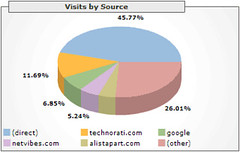
The chart gives a good overview af what’s been going on. Information of individual referring pages are stowed away another place. About 12 percent of our traffic come from Technorati. I want to know more details about these referrals. Which keywords generate the traffic? What are people searching for? How does that link to our pages? Here is where to find it:
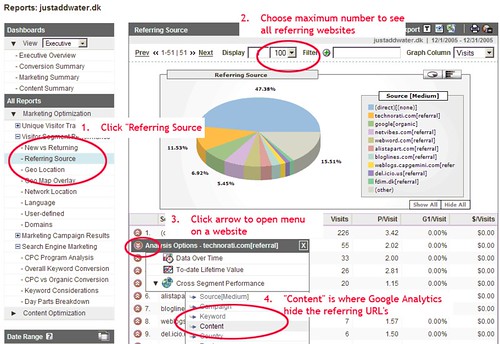
- From the left menu, choose “All reports” > “Marketing Optimization” > “Visitor Segent Performance” > “Referring Source”
- On this page are the referring websites. Well, default view is only the top ten referring websites. To see all of them, I change the dropdown to 100, which is enough for our website.
- The arrow nex to each website on the list is a hidden menu. Choose “Cross Segment Performance”, and whoaa, another menu appears.
- Choose “Content” to bring up our destination: Finally a list of referring URL’s from a website.
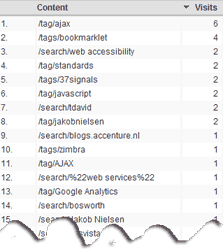
The list is really interesting. It shows a very few keywords with more than a few hits. 55 visitors arrived from Technorati via 41 different pages/searches. To see full list of keywords, click image above. Of 41 keywords, only “ajax” and “bookmarklet” generate more than two clicks. Considering the relatively small number of visitors on our blog, this generates a long tail of keywords. We see that the “popular” keywords (“ajax” and “bookmarklet”) only generates a fraction of the visits, the most of our visitors arrive via unpopular, unpredictable keywords.
(I will not go into detail about it here. See Jared Spool blog post and Wired article for more on the Long Tail of web economy — very interesting).
In the next couple of days we’ll post more on
- what Google Analytics could improve, and
- our monthly statisticss from Google Analytics
While you’re waiting for the December statistics, here’s a link to the previous Justaddwater.dk November 2005 Statistics.
Technorati Tags: google analytics, google, stats, hacks, technorati



January 14th, 2006 at 13:27 (UTC)
Just a quick note to say that “Unofficial Google Analytics Blog” from ROIrevolution has a short comment on this article (for some reason there’s not an automatic link back from the website):
http://www.roirevolution.com/blog/2006/01/using_google_analytics_to_find_referring_urls_1.html
January 17th, 2006 at 16:43 (UTC)
[...] Recently I have looked for better ways to display incoming links (referring URLs), Google Analytics can but it’s a tedious process. The WordPress Dashboard can only show some of the incoming links. [...]
January 17th, 2006 at 22:47 (UTC)
Using Google Analytics to find referring URL’s
Jesper Ronn-Jensen of Capgemini Denmark who writes the JustAddWater blog wrote a very detailed, nicely illustrated blog entry entitled “Google Analytics trick: How to view referring URLs”. Google Analytics makes it easy to find the referring website …
January 21st, 2006 at 09:33 (UTC)
[...] Jesper Rønn-Jensen of Capgemini Denmark who writes the JustAddWater blog wrote a very detailed, nicely illustrated blog entry entitled “Google Analytics trick: How to view referring URLs“. [...]
February 1st, 2006 at 03:49 (UTC)
FYI, I’ve put together an open source tool for tracking Technorati hits. Read about the Technorati Tracker here:
http://www.apogee-web-consulting.com/blogger/2006/01/technorati-explore-update-to.html
Let me know if you’d use it.
February 1st, 2006 at 08:20 (UTC)
Richard, thanks for pointing to the Technorati Tracker. It looks like a very good supplement to Google Analytics. However, we get (basically) the same information from MeasureMap.
(Recently, we Added MeasureMap web tracker to justaddwater.dk)
February 3rd, 2006 at 20:31 (UTC)
Jesper, thanks for looking at the Technorati Tracker tool. Have you been getting many hits from the new Technorati Explore section or do most of your hits come from the Search or Tag sections? BTW, next time you need a break, play a game of Technorati TagMan:
http://apogee-web-consulting.com/cgi-bin/tagman.pl
Enjoy!
February 8th, 2006 at 14:06 (UTC)
[...] Google Analytics trick: How to view referring URLs (69 visitors) [...]
February 27th, 2008 at 09:47 (UTC)
Thanks for this tip! It got me mad I didn’t find it without your help ;-)
March 19th, 2008 at 19:06 (UTC)
Great tip. Thanks for sharing with us.
March 24th, 2008 at 04:43 (UTC)
xPYRvX j09ham0ht0o
April 3rd, 2008 at 15:14 (UTC)
Richard, thanks for pointing to the Technorati Tracker. It looks like a very good supplement to Google Analytics. However, we get (basically) the same information from MeasureMap.
April 21st, 2008 at 11:48 (UTC)
Thanks Jesper,
Great tip with easy to understand instructions. I have been using Google Analytics for about a year now and am still figuring out individial areas of the system.
April 22nd, 2008 at 05:12 (UTC)
Just looking back on this post – it’s amazing how far Analytics has developed in the last couple of years. The graphs certainly have improved a lot!
May 4th, 2008 at 01:09 (UTC)
I find Google Analytics much more useful for finding long tail keyphrases than services like Hittail and the like. At first I had issues with Google having the access to all of my sites stats. But it has been very worthwhile. You never really know what visitors were looking for on your site until you have good stats in place.
May 21st, 2008 at 03:48 (UTC)
Google analytics is probably one of the most accurate tracker out there. Some other trackers such as awstats and statcounter usually over estimate the traffic and it doesn’t show you enough information. Thanks for sharing this. We all love Google because of it is simplicity and it great functions.
May 21st, 2008 at 19:16 (UTC)
Thanks for the info. Google Analytics is not always as user-friendly as one would think!
May 30th, 2008 at 04:33 (UTC)
gfdgdf gdfgsdfg gdfsgsd gdsfg sd better then pornohub
May 30th, 2008 at 04:54 (UTC)
DFGDFG GDF gfgdf gdfgdsf pornotv net
June 20th, 2008 at 01:46 (UTC)
I love Google Analytics too, but doesn’t it also use cookies in addition to the javascript code that they ask you to put in the header for each site?
Someone here said that its considerably more accurate than awstats, however awstats directly reads the log file from apache, which neither lies nor has an inaccuracies in it.
If Google uses a cookie, or should google’s analytic servers become overloaded during a rush or emergency ( I.E. international soccer match, NBA Finals, Multi-State Flooding, Presidential announcement etc.) then whats the possibility that even Google’s mighty servers may drop certain informations or data?
Someone above said that Google Analytics is probably one of the most accurate trackers out there, and while i generally agree with that, I am also just warning that there are circumstances when it might be possible fo it to either fail or give slightly inaccurate results.
Cheers
June 26th, 2008 at 01:16 (UTC)
I personally love Google Analytics, I guess Internet Marking guy has some really good points, but I prefer it over Awstarts. Its much prettier and I like the export and graphs. I have a couple of blogspot blogs, so you can’t use awstarts for them. So google analytics is great for me.
July 4th, 2008 at 01:18 (UTC)
I’ve never been much for Analytics but I may have to try this out.
July 4th, 2008 at 08:44 (UTC)
thanks for the useful tutorial here…i will try to do some analyzing as well ;)
July 4th, 2008 at 11:53 (UTC)
I love google analytics. Great tips here!
July 6th, 2008 at 01:35 (UTC)
bookmark you thx
July 6th, 2008 at 05:03 (UTC)
Punk not dead
July 7th, 2008 at 14:38 (UTC)
gfhfdghfdg dog sexmummy
July 7th, 2008 at 15:07 (UTC)
Google analytics is great, fully functional. But there is something sinister about it as well.
July 8th, 2008 at 01:42 (UTC)
i agree that google analytics is an amazing tool. I dont think that there is better way to figure out your websites or blogs stats.
July 9th, 2008 at 15:07 (UTC)
Considering our options at the moment are limited to the AWstats thing and paying loads of money to have some commercial software, Google Analytics is the only option really
July 9th, 2008 at 22:16 (UTC)
I agree, google analytics is probably the best way to go concerning stats. I have tested awstats and google analytics and i actually found discrepancies. Google analtics doesnt miss much.
July 15th, 2008 at 00:56 (UTC)
I really like google analytics as well. It works great and it is very accurate.
July 16th, 2008 at 10:26 (UTC)
i really love analytic…make things go easy
July 22nd, 2008 at 20:17 (UTC)
Wow, old schools analytics looks very different. I didn’t use it back in the day (was a big Awstats fan) but I use it on almost all of my sites these days.
July 25th, 2008 at 01:33 (UTC)
There are two things holding me back from Analytics. My main concern is Im not to keen on having Google know everything about my website. I mean I want to hold on to what little control we have left over the internet and this is just one more way to give it up. My 2nd thing is because they weren’t showing me the referring URLs. I may consider putting this on some of my smaller sites that I dont care too much for
July 28th, 2008 at 09:08 (UTC)
Good news is that now it is a lot simpler to access referring URLs by just clicking on the referring website.
July 30th, 2008 at 17:11 (UTC)
Haha! – I gave up with this and decided to use another tracking tool for this need. Thanks for the tip, why oh why didnt they make this more of a obvious feature. Good entry Jesper!
August 1st, 2008 at 13:05 (UTC)
Google anaytics works great for me and this is a great tip, I wondered where this feature was
August 2nd, 2008 at 01:38 (UTC)
I share some of the same sentiment that others have about big brother Google knowing all of our stats, but on the other hand, that information is so imporant to help us know where we need to work on and improve with SEO.
Ive used Statcounter, but am considering Analytics for some of my sites.
BTW- 12% technorati traffic sounds like quite a bit of traffic from that one source!
August 4th, 2008 at 18:43 (UTC)
This is a best site,
August 5th, 2008 at 01:48 (UTC)
I’ve tried several times to verify my website with google but to no avail. My website changes the title names of files when I upload them. You’ve motivated me to try again, but like I said I’ve already tried several times – I wish there were an easy way to verify my site…
August 8th, 2008 at 16:55 (UTC)
wow. we use analytics all the time and did not know this. in fact have almost given up on it lately on our own site in favour of Woopra for exactly this reason.
revisit time :) thanks so much, really like this blog btw, read it a lot.
August 13th, 2008 at 18:19 (UTC)
Google analytics is just packed with cool features like this one. In my opinion it is the best for tracking visits.
August 19th, 2008 at 04:41 (UTC)
I use Analytics and dig through the data obsessively. There is just so much you can discover, can get lost in it for hours. Only thing I don’t like is it takes 24 hrs to update… I don’t see why they can’t just make it real time like all the others? They are google after all!
August 25th, 2008 at 07:09 (UTC)
My only real problem with google analytics is that it doesn’t work very well with a lot of ASP pages, which a lot of clients use nowadays. It can also get kind of hairy when trying to get it to understand what a conversion is. :D Instead of just any click, it needs to be one specific click haha.
August 26th, 2008 at 13:22 (UTC)
Thanks for this tip! Just getting started with Google Analytics!
August 26th, 2008 at 15:17 (UTC)
Nice advice, I’m pretty experienced with Google analytics, however I do think it will be very useful for those just beginning to use it. I must admit I was quite taken back at first by the options available in analytics. So any tips and how to’s on it are very handy to have. So kudos to you!!
August 26th, 2008 at 21:53 (UTC)
the new wordpress for the iphone makes working from home and the road much easier not to mention the overtime!
August 27th, 2008 at 01:23 (UTC)
comment6,
August 31st, 2008 at 13:52 (UTC)
Thanks for the tip! Will try to implement it!
September 2nd, 2008 at 21:10 (UTC)
eWallet sounds very promising. I am eager to see whats in store.
September 7th, 2008 at 07:14 (UTC)
Thank you SO much for posting this! I cannot tell you how long I have been trying to figure out how to find the referrals links only to either find the domain and spend countless amount of time trying to find it on the website. Great info!
September 12th, 2008 at 17:46 (UTC)
Thanks for this tip! It is always good to be able to do this through google analytics! I always had to check this through AWStats! Thanks for this tip!
September 12th, 2008 at 21:42 (UTC)
Thanks for the tip. I am somewhat skeptical however, of the validity of the stats. I use several tools, including compete.com which if you can afford it, is a quality tool.
September 16th, 2008 at 18:37 (UTC)
Why I couldn’t find that feature? I think there might be many more feature which are still hidden. Of course we can optimize our sites in more better way if we can know all that.
September 17th, 2008 at 17:30 (UTC)
Very nice trick Jesper ,we use analytics all the time and did not know this.
keep up the good work
September 21st, 2008 at 00:39 (UTC)
Nice tips Jesper. I personally like Google Analytics because it is much more accurate then AWStats, and does not increase the server load like many stats packages.
September 21st, 2008 at 14:44 (UTC)
2 Bill:(I personally like Google Analytics because it is much more accurate then AWStats)
We shouldn’t compare ‘em cause they re DIFFERENT!
September 26th, 2008 at 18:04 (UTC)
Hi,
Thanks for the tip.
At the moment I am trying out Google Analytics and Statcounter.com. I would appreciate knowing what you think about Statcounter. Have you ever used it?
All the best
Costa
October 7th, 2008 at 21:41 (UTC)
While I’m not a brain surgeon, I can usually put together IKEA furniture! But when it comes to the Google Analytics stuff, I tend to get the dreaded “deer in headlights” syndrome. After reading this article, however, I can heartily recommend to readers that it really does help better understand and grasp what’s important in analytics use. Thanks!
October 11th, 2008 at 19:38 (UTC)
Hey,
Awesome information!
Thanks for the help. I have had Google Analytics for awhile now and have always been curious about this. Costa, I also use Statcounter. I like using it for Live Updates. (Sometimes I think I check my statistics too often.)
Anyway, thank you for the information!
October 20th, 2008 at 08:09 (UTC)
Hey. I posted a comment on this blog a little while back and wanted to point out a great tool that I believe everyone should use. Google Webmaster Tools. It’s a great tool that allows you to keep track of links back to your site and where you rank for top searches on Google. Many things like that. It allows you to see what you can improve on. Much like SEO Elite if I am not mistaken. However, Google Master Tools is free. I definitely recommend checking it out.
God Bless,
Taylor Thompson
October 20th, 2008 at 16:20 (UTC)
Thats all nice to help keep track of your links, but you shouldn’t worry too much about seeing where your links are showing up. You should focus on trying to get more links instead of constantly looking at your own stats.
October 20th, 2008 at 18:26 (UTC)
As you are correct Matt, it’s also nice to know what you should focus on.
For instance, maybe Google Webmaster tools has found that you’re on page 2 of Google for a major key term that’s searched fairly often and originally, you had no idea you were ranking highly on Google for that key term.
Well, now you can add that keyterm into your link building strategy and emphasize it a little more while searching for backlinks.
October 31st, 2008 at 09:37 (UTC)
Google Analytics is vastly talked about, and I hear it everywhere. I personally don’t have much experience in it, but this gets me inspired to check it out. I have looked into it before, but I think I got side tracked and forgot about it. :(
Is it really as amazing as people claim it to be?
November 27th, 2008 at 07:07 (UTC)
Hey guys, :) I ran across this article on important metrics of Web analytics. It covers conversions, drop-out rates, return on investment, and revenue per visitor, which are items that Google Analytics helps with. It might help if people knew a little more about these concepts before dabbling with Google Analytics. Cheers!
-Kira “Webmistress” Reynolds
December 4th, 2008 at 12:51 (UTC)
Jesper, thanks a lot, it was a problem for me – i couldn’t figure out where to find reffering links in Analytics. Bookmarked it.
January 10th, 2009 at 02:01 (UTC)
I tend to only be interested in traffic from search engines, however, this is a useful tip for those interested in where referring traffic is originating from.
January 12th, 2009 at 10:55 (UTC)
http://www.kaboodle.com/kerolisa
January 12th, 2009 at 13:52 (UTC)
http://www.kaboodle.com/micronion
January 12th, 2009 at 14:46 (UTC)
Nice article, keep up the good work,
www.krossbar.com
January 14th, 2009 at 17:26 (UTC)
i love google analytics and the referrer lookup is really great. but there is one thing i couldn’t manage so far. users that register on my website get an email with an activation url they have to click to finalize the registration process. when i check the referrers in google i get in the first ~40 rows all the webmail providers.
this i do not consider as “real” traffic to my website. so, is there any chance to filter all webmail providers?
January 28th, 2009 at 19:14 (UTC)
Google analytics is a great tool! Another way to analyze site metrics in order to make changes in the way you target traffic. Thanks for the tip.
March 14th, 2009 at 02:35 (UTC)
Thats all nice to help keep track of your links, but you shouldn’t worry too much about seeing where your links are showing up. You should focus on trying to get more links instead of constantly looking at your own stats.
March 14th, 2009 at 02:38 (UTC)
I agree, google analytics is probably the best way to go concerning stats. I have tested awstats and google analytics and i actually found discrepancies. Google analtics doesnt miss much.
March 17th, 2009 at 13:52 (UTC)
I think google analytics is a very good tool, and it is very accuarte with regards to statictics, reviewing refering url will help you target your content to your viewer better.
March 22nd, 2009 at 17:57 (UTC)
hey thanks for the tip, and with the goole analytics, it helps alot regarding the statics, at least its not hypothetical without figures
May 5th, 2009 at 17:01 (UTC)
oh my god lol I stopped using Analytics because I couldn’t find this information out and noone helped me in their support forum area.
I also could not figure out how to find out how people are leaving my site like what are they clicking off to leave my site or are they just Xing out…
Do you know how to tell this information I think thats very important too…
May 9th, 2009 at 20:57 (UTC)
Finally someone who can write a good blog ! . This is the kind of information that is useful to those want to increase their SERP’s. I loved your post and will be telling others about it. Subscribing to your RSS feed now. Thanks
May 14th, 2009 at 18:22 (UTC)
Hey,
Awesome information!
Thanks for the help. I have had Google Analytics for awhile now and have always been curious about this. Costa, I also use Statcounter. I like using it for Live Updates. (Sometimes I think I check my statistics too often.)
Anyway, thank you for the information!
June 19th, 2009 at 15:19 (UTC)
Nice post! I believe the GA interface has changed a bit. have you thought about updating your post? Keep up the good work, cheers!
June 23rd, 2009 at 15:09 (UTC)
Thanks for this tip. I’ve always been frustrated by the lack of full URLs. It’s working perfectly.I guess you could always count on google for anything now huh? :)
July 16th, 2009 at 17:14 (UTC)
This is a good tip. I think a lot of people benefit from this… It would be even greater if google picked this up and would improve this…
Best regards from the netherlands,
Brandveiligheid
August 9th, 2009 at 11:58 (UTC)
Hi, thanks for sharing this. i always use google analytics for all of my blog.
August 10th, 2009 at 05:11 (UTC)
Google analytics is a great tool! Another way to analyze site metrics in order to make changes in the way you target traffic. Thanks for the tip.
August 11th, 2009 at 10:06 (UTC)
There are known methods to adjust GA tracker in a way to show reffering pages in GA GUI. There are even those who say that can increase google rankings.
Great article, indeed.
August 14th, 2009 at 04:44 (UTC)
I use Google analytics on all of my websites! It a great tool and it helps me with my website marketing. And I can see where the Traffic is coming from.
August 14th, 2009 at 07:45 (UTC)
Thats great thanks, as quite a new webmaster Im learning a lot from your blogs, and others on the net.
August 16th, 2009 at 08:17 (UTC)
Hello. I also use Google Analytics on my site and it is really very useful to track your visitors and where they come from.
August 17th, 2009 at 16:15 (UTC)
I find Google analytics really helpful especially when looking for keywords that convert well, I have nearly doubled my turnover as I can now easily see which keywords to promote most XD
August 22nd, 2009 at 04:19 (UTC)
hey, thanks for the information about google analytic. I never thought that I can actually check my daily visitors with this cool apps from google.
August 22nd, 2009 at 12:37 (UTC)
In time, you’ll find that continuous and regular cardiovascular workouts can help you to achieve everything that you want to in terms of weight loss. Of course, it is going to be a bit of a battle to start out with, but eventually you’ll find that you honestly feel better after workouts than you did before, and that will make you feel like working out more.
August 22nd, 2009 at 23:59 (UTC)
I have been using google analytics for quite some time and I will have to agree it has developed into an amazing tool to track links etc. The upgrades they have made over time have truly made it quite easy to use and a much more powerful tool
August 25th, 2009 at 13:11 (UTC)
I use Googe Analytics for over 50 sites and find it the best analytics tools. Especialy I like posibility for adding new search engines (local and non-mainstream) for tracking keywords
August 29th, 2009 at 13:25 (UTC)
Yeah I think the same, best webmaster tool for me too, Google Analytics is really really great.
Thanks a lot for the trick really useful (and sorry for my english I’m french ;) )
September 3rd, 2009 at 10:25 (UTC)
Nice post friend. Its a nice tool I use it earlier, but you are sharing valuable information with common people . This trick work well.
9/10 for the post
:)
thoi trang
September 3rd, 2009 at 22:13 (UTC)
This is something that everyone should learn. I am glad that I stopped by.
September 4th, 2009 at 22:23 (UTC)
Thanks for this helpful info.
September 6th, 2009 at 00:02 (UTC)
I enjoyed reading from this. Thanks.
September 6th, 2009 at 04:36 (UTC)
What a wonderful and helpful blog
September 7th, 2009 at 19:49 (UTC)
Thank you for this information. It has been very helpful
September 8th, 2009 at 17:44 (UTC)
I have bookmarked this blog. It’s very educational.
September 9th, 2009 at 03:04 (UTC)
Thats a good trick to see the urls. I have been using analytics for a while but I havent looked into things that much. Thanks.
September 10th, 2009 at 21:40 (UTC)
Google Analytics has always been on top. Thanks for the information and for clarifying the facts as well. I am very glad that i read this useful detail. Brilliant !
September 14th, 2009 at 23:32 (UTC)
I am not that big on analytics. I mostly use Awstats to see the details for my visitors. The more I learn about analytics the more I want to use it though.
September 30th, 2009 at 05:30 (UTC)
Whoa, it seems you can always dig deeper in analytics, I didn’t know you can do that. I’ve been using analytics just for record keeping, guess I was wrong
October 2nd, 2009 at 18:27 (UTC)
Thanks a lot for sharing. It’s been a great help.
October 2nd, 2009 at 21:26 (UTC)
Google Analytics is one of the best tools for tracking visitors and their activities. and thanks for sharing the info.